 SaveThread
Threads Video Downloader
Paste a public Threads post link and save the video in HD, free and in seconds.
- Free
- No watermark
- HD quality
- No app needed
Updated · By SaveThread team
To download a Threads video, copy the post link (Share → Copy link), paste it into the box above and press Download. SaveThread finds every video and photo in the public post and saves them as MP4 or JPG in the original quality, free and without an app or account.
How to download a Threads video in 3 steps
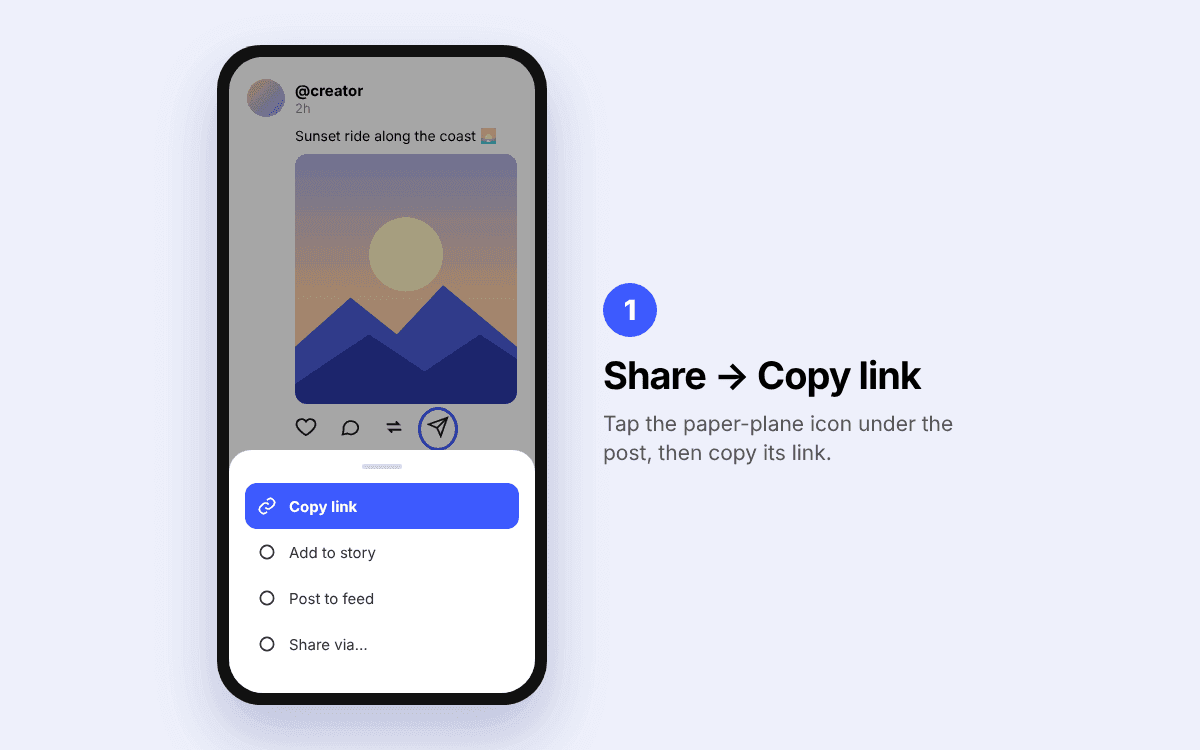
Copy the post link
In the Threads app, tap the Share icon (the paper plane) under the post and choose Copy link. On a computer, open the post and copy the address from the browser bar.
Paste it into SaveThread
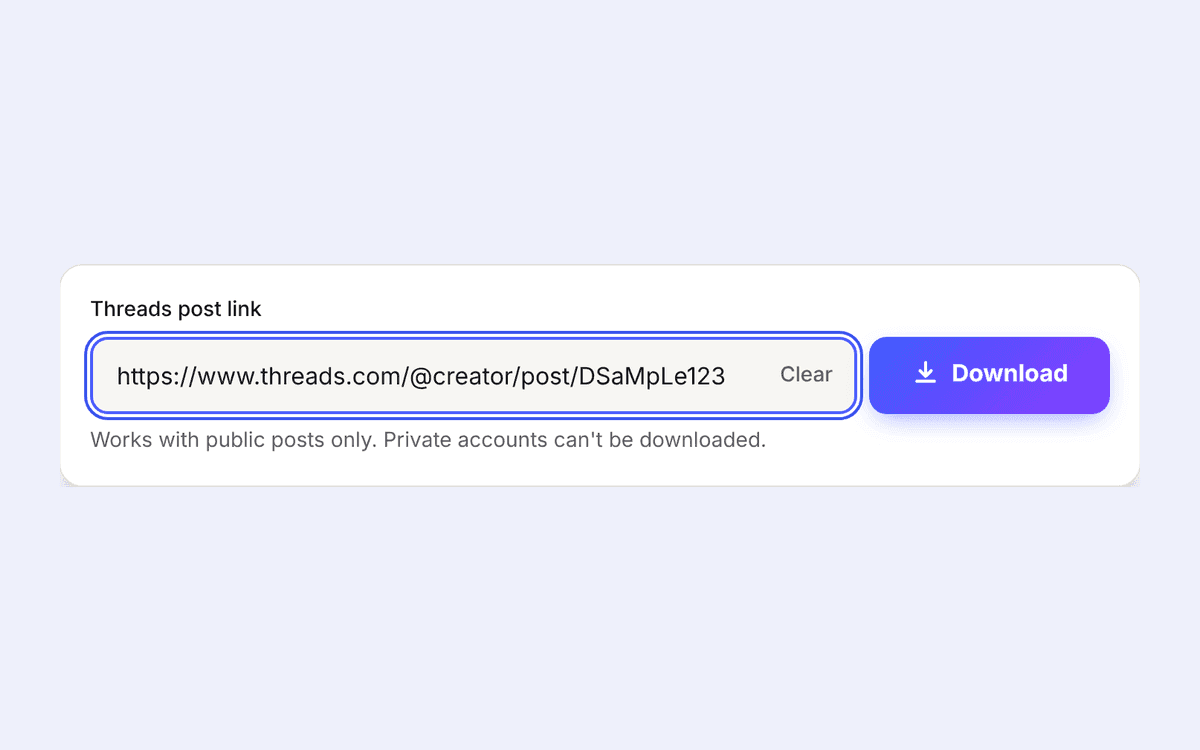
Come back to this page, tap Paste (or paste into the box yourself). The search starts on its own as soon as a valid Threads link is pasted.
Save the video
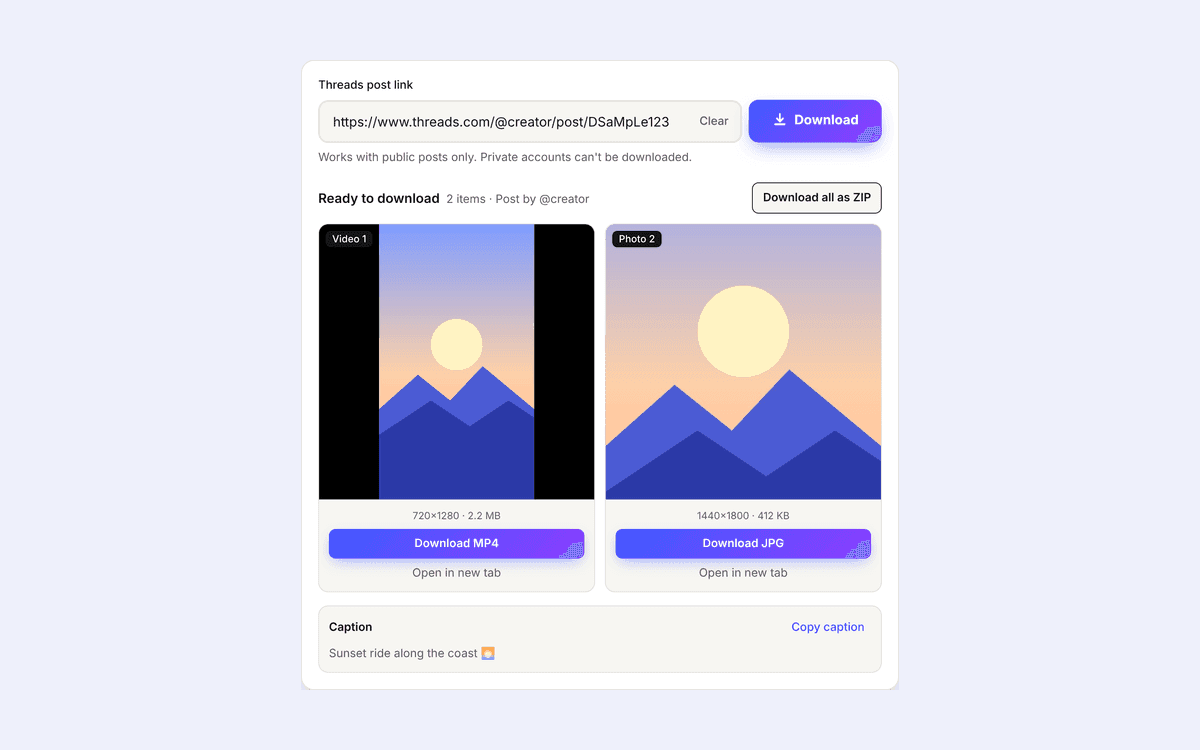
Every video and photo in the post appears as its own card with a preview. Press Download MP4 or Download JPG, or Download all as ZIP for posts with several items.
Need device-specific help? Follow the guide for iPhone, Android or Windows and Mac.
SaveThread at a glance
| Question | Answer |
|---|---|
| Price | Free, no limits on normal use |
| Account or login | Not needed |
| App to install | None, it runs in your browser |
| What you can download | Videos (MP4), photos (JPG), carousel posts, and the post caption |
| Quality | The original file Threads stores, the same resolution the creator uploaded |
| Watermark | None added by SaveThread |
| Links that work | threads.com and threads.net post links, including share links from the app |
| Devices | iPhone, iPad, Android, Windows, Mac, Linux, Chromebook |
| Private accounts | Not supported, only public posts |
| Languages | English and Bahasa Indonesia |
Why people use SaveThread
Original quality
You get the exact file Threads serves for the post. Nothing is re-encoded or compressed again.
No watermark added
SaveThread puts no logo of its own on your downloads.
Preview before you save
Play the video or view the photo right on the page, so you only download what you want.
Carousels made easy
Posts with several videos or photos are split into separate items, with one button to download them all as a ZIP file.
Copy the caption
The post text is shown under the results with a one-tap copy button, handy for credits and notes.
Paste and go
The search starts as soon as you paste a link, no extra taps.
Clean and fast
No pop-ups, no redirects to other sites, no fake download buttons.
Private by design
No account, no history, and we don't keep copies of the videos you download.
What you can and can't download from Threads
SaveThread works with any public Threads post that has media in it. That covers single videos, single photos, and carousel posts that mix several videos and photos. For photos, use the same box or the dedicated Threads photo downloader.
Some things can't be downloaded, by any tool, because the media isn't public or isn't stored on Threads:
- Posts from private accounts, or posts that only show after you log in.
- Deleted posts, or posts hidden by Threads.
- Text-only posts and replies with no video or photo.
- Link previews to other sites, such as a YouTube or news link shown as a card. The video lives on that other site, not on Threads.
If a download doesn't work, the troubleshooting guide explains every error message and how to fix it.
What quality are downloaded Threads videos?
SaveThread downloads the version of the video that Threads itself plays, at the highest resolution available for that post. In our tests, a typical vertical video comes out at 720×1280 with sound, as an MP4 file that plays everywhere.
The final quality depends on what the creator uploaded. If a video was posted in low resolution, no downloader can make it sharper, and tools that promise "4K" for Threads videos are simply upscaling. Each result card shows the real resolution and file size before you download, so you know exactly what you're getting.
Are the downloads watermark-free?
Yes. SaveThread fetches the original media file and adds no watermark, logo or end screen of its own. The one exception is a watermark that is already part of the video, for example a TikTok logo on a video that was re-posted to Threads. That logo is burned into the picture, and SaveThread doesn't alter videos. More details are on the no-watermark page.
Where do downloaded Threads videos go?
| Device | Where the file is saved | Full guide |
|---|---|---|
| iPhone / iPad | Files app → Downloads. Use Share → Save Video to move it to Photos. | iPhone guide |
| Android | Download folder. Gallery and Google Photos usually show it automatically. | Android guide |
| Windows | This PC → Downloads. Press Ctrl + J in Chrome or Edge to see it. | PC and Mac guide |
| Mac | Downloads folder in Finder. Press Option + Command + L in Safari. | PC and Mac guide |
Is SaveThread safe to use?
Yes. There is nothing to install and no account to create, so you never share your Threads password with anyone. Downloads come straight from Threads' own media servers and are passed to you unchanged. We don't store the videos, and the links you paste are not saved to any history. You can read exactly what we process in our privacy policy.
Please respect creators. Download videos for personal use, or when you have the creator's permission. Re-uploading someone else's work as your own can break copyright law and Threads' rules. When you share, give credit, and the copied caption makes that easy.
Frequently asked questions
Is SaveThread free?
Yes. The Threads downloader is completely free and works without an account or subscription.
Do I need to install an app?
No. SaveThread runs in your browser on any phone, tablet or computer. Nothing is installed on your device.
Do I need to log in to Threads or Instagram?
No, and you should never give your password to a download site. SaveThread only works with public posts, which don't require a login.
Can I download videos from private Threads accounts?
No. Private posts are only visible to approved followers, so SaveThread can't access them. This protects the privacy of private accounts.
Why does it say no video was found?
Usually the post is private, deleted or text-only, or the link is a profile link instead of a post link. See the troubleshooting guide for every cause and fix.
Does it work with the share link from the Threads app?
Yes. Links from the app's Copy link button and links copied from the browser (threads.com or threads.net) both work.
What quality will I get?
The highest quality Threads has for that post, usually the same resolution the creator uploaded. The card shows the exact resolution and size before you download.
Can I download Threads photos too?
Yes. Photos appear next to videos and save as JPG files. The Threads photo downloader page explains photo downloads in detail.
How do I download every video in a carousel post?
Paste the post link once. Each item gets its own card, and the Download all as ZIP button saves them together in one file.
Can I copy the caption of a Threads post?
Yes. When the post has text, it's shown under the results with a Copy caption button.
Can I save Threads videos to my iPhone's Photos app?
Yes. After downloading, open the file in the Files app, tap Share and choose Save Video. The iPhone guide has screenshots of each step.
Is there a download limit?
No daily limit for normal use. If many requests come from the same connection in a short time, we ask you to wait a minute, which keeps the service fast for everyone.
Does SaveThread keep a copy of my downloads?
No. Files are streamed from Threads' servers straight to your device. We don't store videos, photos or a history of the links you paste.
Is it legal to download Threads videos?
Saving public content for personal viewing is generally treated differently from re-publishing it. Re-uploading or making money from someone else's video without permission can infringe copyright. This is general information, not legal advice.
Will the creator know I downloaded their video?
No. SaveThread doesn't notify anyone, and downloading doesn't like, follow or interact with the post.
Is SaveThread connected to Threads or Meta?
No. SaveThread is an independent tool and is not affiliated with, endorsed by or sponsored by Threads, Instagram or Meta Platforms, Inc.